
High direct traffic in GA4 explained and how to interpret it correctly
Direct traffic in Google Analytics 4 is one of the most misunderstood metrics in modern analytics. Many marketers notice that Direct suddenly becomes one of the largest traffic sources and are left wondering whether this means strong brand awareness or a serious tracking issue.
The reality is that direct traffic in GA4 is rarely just one thing. Sometimes it reflects genuine user behavior. In many cases, however, it signals missing attribution, incomplete tracking, or technical limitations. Understanding the difference is essential if you want to trust your data and make informed decisions.
What direct traffic really means in Google Analytics 4
In GA4, direct traffic represents sessions where no identifiable source or medium could be determined. While it can include users who type your URL directly or use bookmarks, it also acts as a fallback category when GA4 does not receive enough information to attribute a visit to another channel.
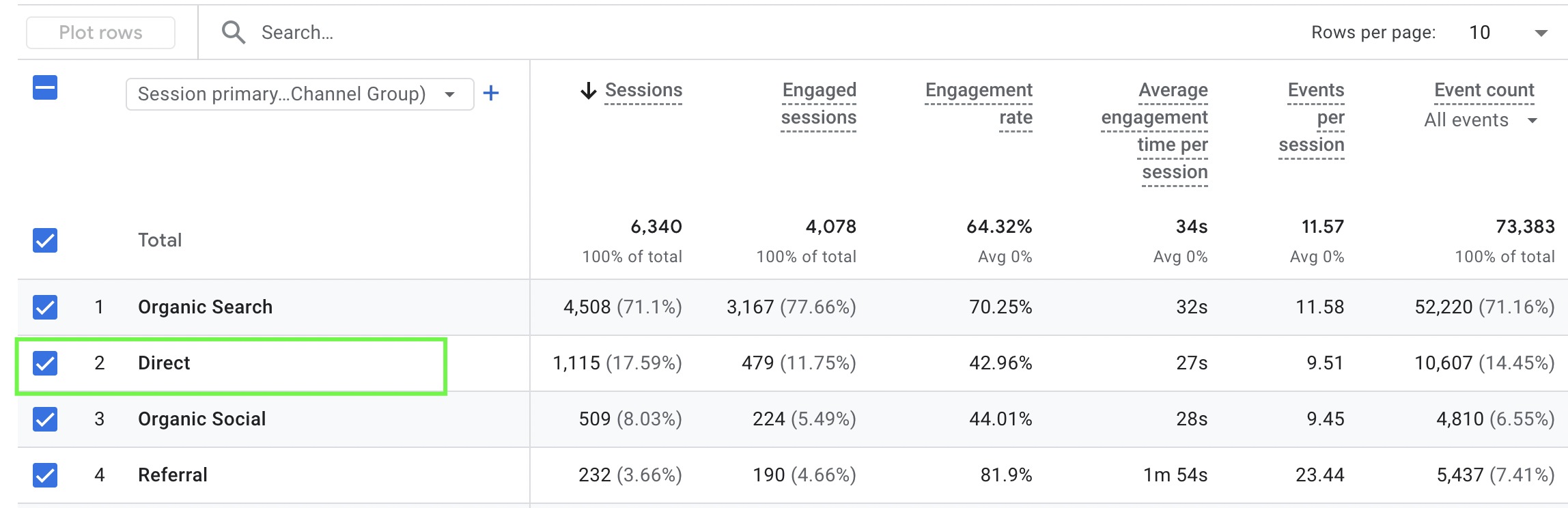
Common scenarios that end up classified as direct include manual URL entry, bookmarked visits, links from non web documents such as PDFs, traffic from certain apps, and any visit where referrer data is missing or stripped.
This means that direct traffic is not always truly direct. In GA4, it often reflects unknown or lost attribution rather than intentional navigation.
When direct traffic in GA4 is a good sign
Direct traffic is not inherently bad. In fact, a healthy level of direct traffic is often a positive signal.
Moderate direct traffic usually indicates brand recognition. Users know your website, remember it, and return without needing a search engine or an ad. Direct visits are also common among returning users who already trust your brand and content.
For established brands, direct traffic often concentrates on the homepage or key landing pages and remains relatively stable over time. In these cases, direct traffic reflects loyalty rather than tracking problems.
When high direct traffic becomes a problem
High direct traffic becomes concerning when it grows suddenly, dominates acquisition reports, or behaves inconsistently compared to historical data.
In these situations, direct traffic usually points to attribution issues. Missing UTM parameters, broken redirects, cross domain tracking problems, or browser privacy restrictions can all cause traffic from other channels to be misclassified as direct.
This misattribution creates serious challenges. Paid campaigns may appear underperforming. Email traffic may disappear. Conversions may be credited to direct instead of the channels that actually drove them. When this happens, marketing optimization becomes guesswork rather than analysis.
Common sources that inflate direct traffic in GA4
Understanding where inflated direct traffic comes from is the first step toward fixing it.
One common source is untagged or inconsistently tagged campaigns. Emails, paid ads, affiliate links, and social posts without proper UTM parameters often end up as direct.
Another frequent cause is traffic from messaging apps, documents, or dark social channels. These sources often do not pass referrer data, even though they are not truly direct.
Technical issues also play a major role. Improper redirects, HTTPS to HTTP transitions, missing tracking on some pages, or late firing tags can all strip attribution data before GA4 captures it.
Finally, privacy tools and browser restrictions increasingly limit referrer information, especially on mobile devices. As a result, even well implemented setups can see growing direct traffic if tracking is not adapted.
How to diagnose high direct traffic in GA4
Direct traffic should be treated as a signal rather than an answer. It tells you where attribution is missing.
Start by analyzing landing pages for direct sessions. If a large share of direct traffic lands on deep pages instead of the homepage, this strongly suggests misattribution.
Next, review campaign tagging across all marketing channels. Ensure that UTM parameters are applied consistently and follow a clear naming structure.
Check cross domain tracking and referral exclusions, especially if users move between multiple domains or subdomains during their journey.
It is also important to audit your GA4 and GTM implementation. Confirm that tracking fires early and consistently on all pages and that internal traffic is properly excluded.
How to reduce inflated direct traffic in GA4
The goal is not to eliminate direct traffic, but to improve attribution accuracy.
Ensure all outbound marketing links are properly tagged. Fix redirect issues and avoid methods that strip referrer data. Move fully to HTTPS if any legacy HTTP pages remain.
Review your GA4 setup regularly, especially after site changes or new campaign launches. Even small implementation issues can have a large impact on attribution.
For more advanced setups, using Google Tag Manager more effectively or implementing server side tracking can help preserve source data and reduce loss caused by browser restrictions.
Why high direct traffic is ultimately an attribution problem
When direct traffic is inflated, attribution is broken. And when attribution is broken, data driven decision making suffers.
Marketing teams rely on accurate source data to allocate budgets, evaluate channel performance, and optimize campaigns. If too much traffic is grouped under direct, those decisions become unreliable.
Fixing direct traffic issues is less about one specific setting and more about building a tracking strategy that aligns with how users actually reach your site.
Talk to GA4 professionals about fixing high direct traffic
High direct traffic in GA4 is rarely just a reporting quirk. In most cases, it points to deeper issues in tracking, attribution, or implementation.
Working with GA4 experts helps ensure that your analytics setup reflects real user behavior and supports confident decision making. An experienced team can identify attribution gaps, improve tracking logic, and align GA4 reports with actual business outcomes.
If you are struggling to understand high direct traffic in GA4 or want an expert review of your setup, our team can help you diagnose the problem and implement long term solutions.
Contact us to work with GA4 experts and improve your tracking accuracy